
Blog
Remote Control Mastering: Using Voice Search to Find Content

Remote Control Mastering: Using Voice Search to Find Content Instantly with SuperBox
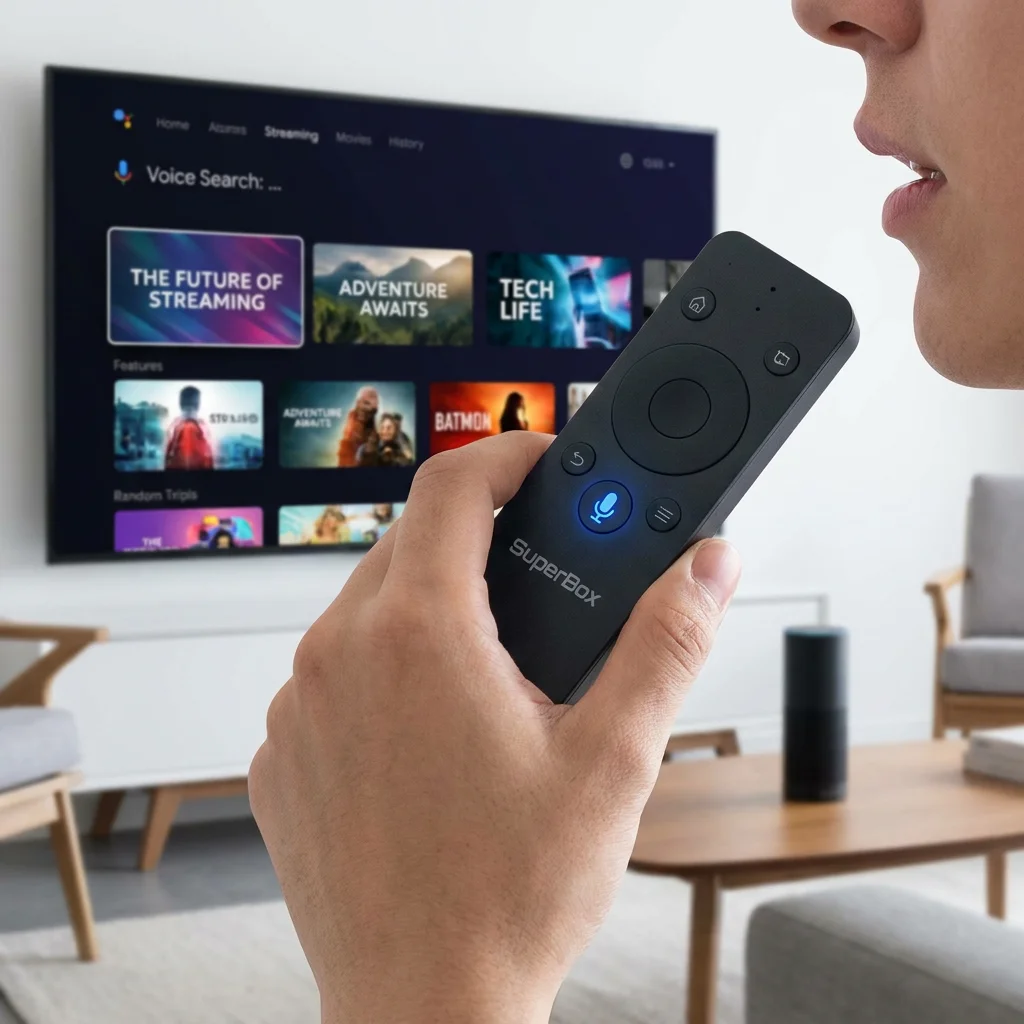
Introduction: The Convenience of Voice Control in the Modern Living Room
In the age of infinite content, the biggest challenge facing viewers isn’t finding something to Experience—it’s finding it quickly and with minimal effort. We’ve all been there: scrolling through endless lists of titles, navigating clunky menus, and struggling to type out long search queries using a slow on-screen keyboard. This is where the SuperBox S7 and S6 series truly shine, fundamentally changing how you interact with your television. With their advanced, integrated voice search capabilities, you can navigate your entire media universe with just a few spoken words.
Voice control is no longer a futuristic gimmick or a niche feature; it’s a powerful, central tool that enhances accessibility, streamlines your entertainment experience, and makes the technology work for you, not the other way around. In this masterclass guide, we’ll explore every facet of the SuperBox remote control, highlighting the sophisticated features of the S7’s upgraded voice technology and how you can save 20% on your purchase today to bring this level of convenience into your home.
The Engineering Excellence of the SuperBox Remote
The remote control that comes bundled with the SuperBox S7 is more than just a peripheral; it is a piece of precision engineering designed for the modern user. It’s balanced to be ergonomic, responsive, and, most importantly, highly intelligent. Let’s break down the technology that makes it the best in its class.
1. Bluetooth 5.0 Connectivity: No More Point-and-Shoot
Unlike traditional infrared (IR) remotes that require a direct, unobstructed line of sight to the box, the SuperBox remote utilizes advanced Bluetooth 5.0 technology. This means you can control your device from almost anywhere in the room—even from under a blanket or around a corner. Bluetooth also provides a much higher bandwidth for data transmission, which is critical for sending high-quality voice data to the box for processing.
2. High-Sensitivity Microphone and Noise Cancellation
The S7 remote features a more sensitive microphone array and an integrated noise-cancellation chip. This allows it to capture your voice clearly while filtering out ambient sounds like background conversation, a humming air conditioner, or the audio from the TV itself. The result is a much higher “first-time” success rate for your voice commands, even in a busy living room.
3. Dedicated, Intuitive Voice Button
Finding and using the voice search function is incredibly easy. There is a dedicated, visually distinct button on the remote that activates the microphone instantly. Simply press and hold the button, speak your command clearly, and release. The SuperBox processes your request in real-time, displaying the results on your screen in seconds. It’s a feature designed to be intuitive for users of all ages and technical skill levels.
Mastering the Art of Voice Commands: Be More Specific
To truly master your SuperBox voice search, it helps to know the range and depth of the commands it can handle. It’s not just about searching for a title; it’s about refining your entire media experience.
1. Advanced Content Discovery
Instead of just saying the name of a Media Feature, try using natural language to filter your results. You can say:
- “Show me high-definition action Cinematic Media from the late 90s.”
- “Find nature documentaries narrated by famous actors.”
- “Search for the latest live concert performances in 4K.”
The SuperBox search engine parses these complex queries and scans across its installed applications to provide you with the most relevant options.
2. Seamless Interface Navigation
Voice search isn’t just a search tool; it’s a navigation tool. You can use it to jump directly to specific parts of the system, bypassing multiple menu layers. Try commands like “Open YouTube,” “Go to Network Settings,” “Launch the system cleaner,” or simply “Go home.” This is particularly useful when you have dozens of apps and want to move between them quickly.
3. The Smart Hub Concept: Information on Demand
Your SuperBox S7 acts as a central information hub. You can use the voice remote to get quick answers to everyday questions without needing to pick up your phone. Ask “What is the current time in Tokyo?”, “Give me the weather forecast for tomorrow morning,” or “How do you say ‘Hello’ in French?” This turns your TV into an active participant in your daily routine.
4. Voice Search for Global Content and Multiple Languages
The SuperBox S7 is a truly international device, and its voice search reflects that. It is designed to recognize and process content titles in multiple languages and from various regions around the world. Whether you are searching for a specific international news Media Source, a foreign language documentary, or a world cinema classic, the voice engine is built to handle the phonetic diversity of global media. This makes it an invaluable tool for multi-lingual households or anyone who enjoys exploring the vast wealth of international content available through the SuperBox ecosystem.
Voice Search vs. Traditional Methods: A Comparative Analysis
Why is voice search so much better? A traditional search requires:
- Navigating to the search bar (3-5 clicks).
- Using arrow keys to select letters on an alphabet grid (20-40 clicks for a typical title).
- Managing typos and corrections.
- Waiting for the search to execute.
With the SuperBox voice search, this entire process is reduced to a single button press and a 3-second spoken phrase. For a person who watches TV for two hours an evening, this can save dozens of minutes every week—time better spent actually enjoying the content.
Accessibility and Inclusivity: A Feature for Everyone
Voice search is one of the most important accessibility features in modern technology. For individuals with limited motor skills, visual impairments, or conditions that make using a traditional small-button remote difficult, the voice feature is a game-changer. It provides a level of independence and ease of use that ensures everyone can enjoy the best of home entertainment without frustration. SuperBox is committed to making technology that is inclusive, and the S7 remote is a testament to that mission.
The Hardware Foundation: SuperBox S7 and S6 Performance
The speed and accuracy of voice recognition are directly tied to the hardware processing power of the media box. The SuperBox S7 is equipped with a high-performance, multi-core chipset that is specifically optimized for natural language processing and voice data decoding. This ensures that the translation from your spoken words to a digital search query happens almost instantaneously, with minimal “thinking” time.
Why the S7 is the Ultimate Efficiency Upgrade
While the S6 series offers very reliable voice search, the S7 takes it to a professional level with its significantly expanded memory and faster processor. This extra “headroom” means the device can handle complex voice parsing while simultaneously managing other background tasks, ensuring a smooth, lag-Subscription-free user experience. If you value your time and demand the best in efficiency, the S7 is the clear choice.
Don’t Miss the 20% Discount Opportunity
There has never been a better time to upgrade your home entertainment system to a smarter, more voice-responsive setup. We are currently offering a 20% discount on both the SuperBox S7 and S6 series. This is a substantial saving on premium technology that will change the way you Experience TV forever. Why settle for a clunky, old-fashioned remote when the future is available today for a fraction of the cost?
Tips for Optimizing Your Voice Recognition Experience
To ensure your voice search works flawlessly every time, keep these best practices in mind:
1. Proper Bluetooth Pairing and Maintenance
Ensure your remote is correctly paired with your SuperBox via the Bluetooth settings menu. If you notice any lag, a quick re-pairing often solves the problem. Also, keep an eye on your battery levels; while the S7 remote is energy-efficient, a low battery can occasionally affect the microphone’s sensitivity.
2. Network Stability and Latency
Voice recognition often uses cloud-based processing for the most accurate results. For the fastest response times, ensure your SuperBox is connected to a stable Wi-Fi network or a wired Ethernet cable. Low network latency is the key to that “instant” feeling when you speak a command.
3. Environmental Awareness
While the S7’s noise cancellation is excellent, it works best if you speak clearly and hold the remote about 2-4 inches from your mouth. In extremely loud environments, lowering the TV volume for a second while you give your command can also help ensure 100% accuracy.
Conclusion: Take Control with Your Voice
Mastering the voice search feature on your SuperBox S7 or S6 will fundamentally change your relationship with your entertainment system. It removes the friction of manual navigation, making your Interactivity experience faster, more fluid, and significantly more enjoyable. It turns your living room into a smart, responsive environment that anticipates your needs.
With the current 20% discount, there is no better time to experience this revolution. Upgrade to the SuperBox S7 today and discover the incredible convenience of instant, voice-activated entertainment. Your favorite Cinematic Media, shows, and information are now just a few words away. Welcome to the future of television control.
Important: To ensure you receive the official, voice-capable Bluetooth remote and full manufacturer support, always purchase your SuperBox from an authorized dealer.
🎁 SPECIAL WELCOME OFFER ACTIVE!
Cut the cord today and save big! Get an immediate 20% OFF sitewide plus an extra $30.00 OFF your entire order automatically. Simply click the red Claim $30 OFF button at the bottom center of your screen to activate your NEWUSER discount, then choose your SuperBox model below!
More From SuperBox Official
- → SuperBox S7 Ultra — 128GB | 6K
- → SuperBox S7 Max — 64GB | 6K
- → All SuperBox Devices
